TwinCAT C++ development
Overview of the development environment
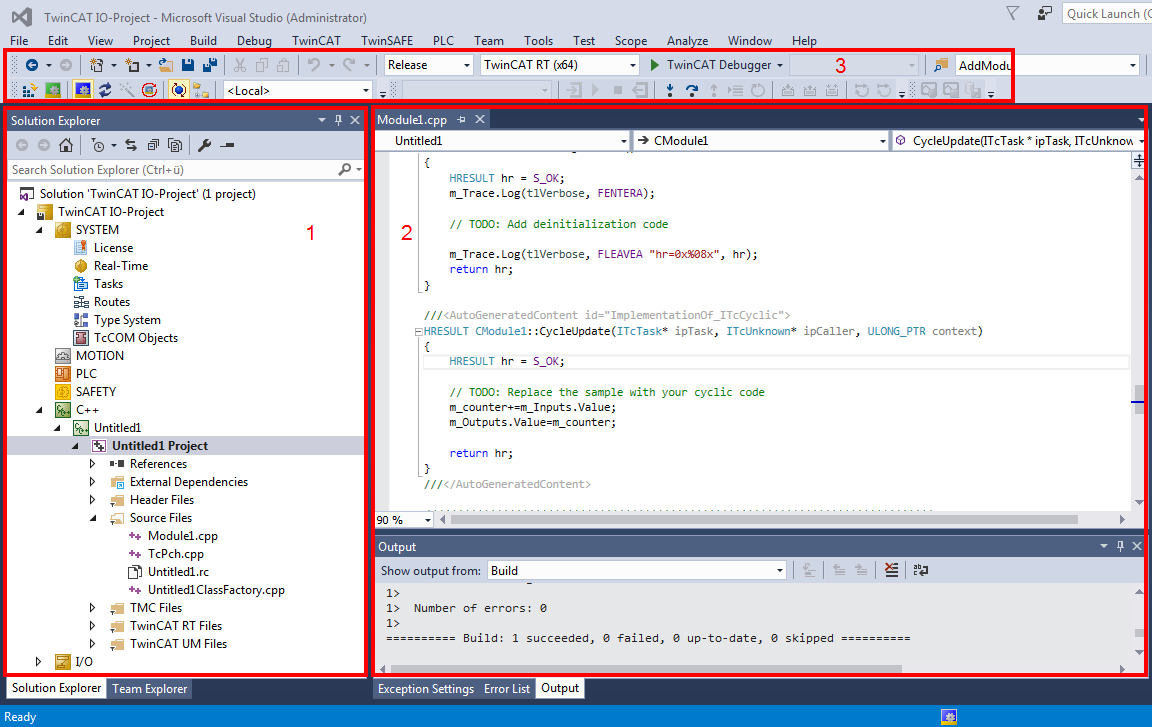
The layout of Visual Studio is flexible and adaptable, so that only a brief overview of a common configuration can be provided here. The user is free to configure windows and arrangements as required.
- In the TwinCAT Solution, a TwinCAT C++ project can be created by right-clicking on the C++ icon. This project contains the sources ("Untitled Project") of several modules, if applicable, and module instances ("Untitled1_Obj1 (CModule1)") can be created. The module instances have inputs/outputs, which can be linked in the usual way ("Link"). There are further options for module interaction.
- The Visual Studio editor for Visual C++ is used for programming. Here, particular attention should be paid to the drop-down boxes for fast navigation within a file. In the lower area the result of the compile process is output. It is also possible to switch to the TwinCAT messages (see Module messages for the Engineering (logging / tracing)).
The usual features such as breakpoints (cf. Debugging) can be used in the editors. - The freely configurable toolbar usually contains the toolbar for TwinCAT XAE Base. Activate Configuration, RUN, CONFIG, Choose Target System (in this case <Local>) and several other buttons provide fast access to frequently used functions. The TwinCAT Debugger is the button for establishing a connection to the target system with regard to C++ modules (the PLC uses an independent debugger). Like in other C++ programs, and in contrast to PLC, in TwinCAT C++ a distinction has to be made between "Release" and "Debug". In a build process for "Release", the code is optimized to such an extent that a debugger may no longer reliably reach the breakpoints, and incorrect data may be displayed.
Procedure
This section describes the processes for programming, compiling and starting a TwinCAT C++ project.
It provides a general overview of the engineering process for TwinCAT C++ projects with reference to the corresponding detailed documentation. The quick start guide describes the individual common steps.
Note: For a quick introduction to TwinCAT C++ development, see the Quick Start guide which walks through creating a simple cyclic counter application in less than five minutes.